MySQL Server
MySQL is the world's most popular open-source relational database system. It's partially named after the founder's daughter and is still owned and maintained by the Oracle Corporation. How to Install The method of installing MySQL may vary per Linux distribution. To install MySQL run the relevant command on your operating system Debian & Ubuntu sudo apt-get update sudo apt install mysql-server CentOS sudo yum update sudo wget https://dev.mysql.com/get/mysql80-community-release-el7-3.noarch.rpm sudo rpm -Uvh mysql80-community-release-el7-3.noarch.rpm sudo yum install mysql-server Changing MySQL Connection Timeout The default connection timeout may need to be adjusted to fit your program if it makes a small amount of MySQL calls. Navigate to /etc/mysql/mysql.conf.d/mysqld.cnf Add the below line to the file under the "Basic Settings" section. wait_timeout = 3153600 3153600 is 36 days. Within this MySQL configuration file, you can also make other changes like allowing outside connections. Allowing Outside Connections The ability to allow outside connections to the MySQL server can be toggled in the configuration file for MySQL. Navigate to /etc/mysql/mysql.conf.d/mysqld.cnf Here you'll find a bind-address setting. Change to your liking If set to 127.0.0.1 the MySQL server will only allow internal connections If set to your servers IP address it will also allow outside connections. When changes to the MySQL configuration file are made the service will need to be restarted.
MySQL is the world's most popular open-source relational database system. It's partially named after the founder's daughter and is still owned and maintained by the Oracle Corporation.
How to Install
The method of installing MySQL may vary per Linux distribution.
To install MySQL run the relevant command on your operating system
Debian & Ubuntu
sudo apt-get update
sudo apt install mysql-server
CentOS
sudo yum update
sudo wget https://dev.mysql.com/get/mysql80-community-release-el7-3.noarch.rpm
sudo rpm -Uvh mysql80-community-release-el7-3.noarch.rpm
sudo yum install mysql-server
Changing MySQL Connection Timeout
The default connection timeout may need to be adjusted to fit your program if it makes a small amount of MySQL calls.
Navigate to
/etc/mysql/mysql.conf.d/mysqld.cnfAdd the below line to the file under the "Basic Settings" section.
wait_timeout = 3153600
3153600 is 36 days.
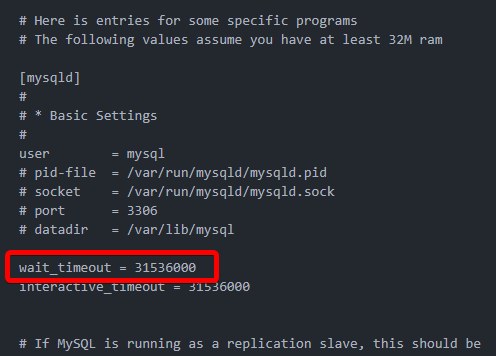
Within this MySQL configuration file, you can also make other changes like allowing outside connections.
Allowing Outside Connections
The ability to allow outside connections to the MySQL server can be toggled in the configuration file for MySQL.
Navigate to /etc/mysql/mysql.conf.d/mysqld.cnf
Here you'll find a bind-address setting. Change to your liking
If set to
127.0.0.1the MySQL server will only allow internal connectionsIf set to your servers IP address it will also allow outside connections.
When changes to the MySQL configuration file are made the service will need to be restarted.